Bintelli Golf Cart Error Codes: Read and Fix Guide
Bintelli dash warnings are useful clues when you record the exact icon, timing, and symptom before clearing anything. Here is what the LCD actually confirms, and what a generic online code table cannot.
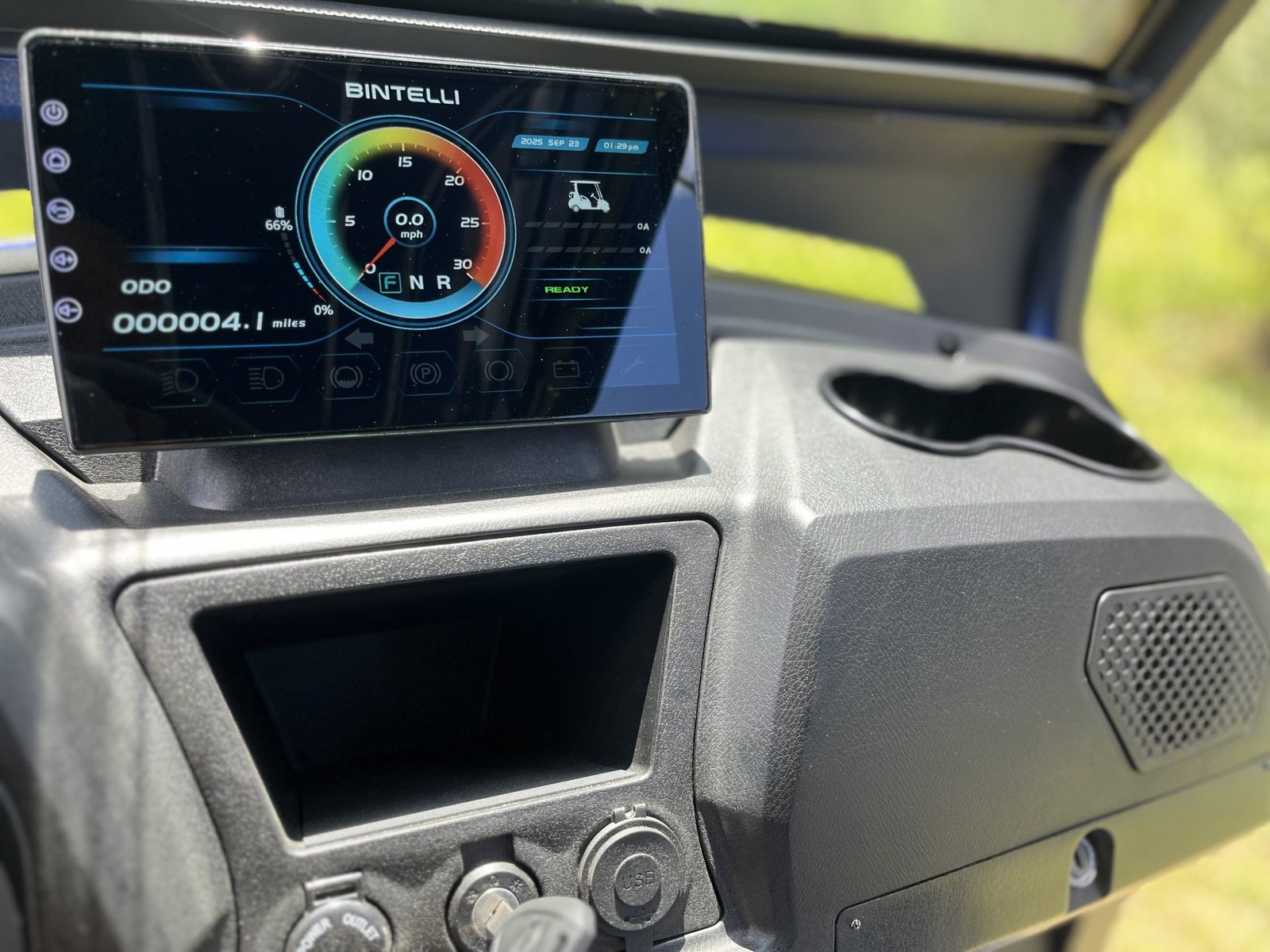
- Photograph the exact LCD number, icon, and battery/gear state before clearing anything. Note startup, charging, hill-climb, braking, or after-storage timing.
- Bintelli confirms the LCD can show a real-time fault or error-code number, but no public Bintelli source publishes a universal Beyond dash-code legend. Treat any online table of exact Beyond codes without a Bintelli source with caution.
- Verified vehicle baseline (2025 Beyond 4 Passenger Lifted): JEVD1-72M450L controller, 72V 165Ah lithium battery, 72V 5kW motor, 400A fuse. Bintelli also hosts a Curtis 1236 manual, but that is controller-family documentation, not proof the current JEVD1 controller shares Curtis dash-code numbering.
- Several warnings trace to normal permission logic, not a failure: charger plugged in (lockout active), Tow/Run in Tow, not starting in Neutral, or the parking brake not released.
- A code that clears on a key cycle but returns is a live, active fault. A code tied to charging, storage, or hill climbs points to a different system than one that appears at rest.
The Beyond uses controller, battery, charger, throttle, and brake inputs to decide whether it should drive normally. A warning is not the repair, but it points you to the circuit to test first. Bintelli confirms the LCD meter can display a real-time fault or error-code number for quick reference, and tells owners to contact a local service center to diagnose the cause and stop using the vehicle. That is the most important verified point: the number matters, so capture it before you key-cycle, unplug the charger, or move switches around.
01: Photograph the Number Before Clearing It
Bintelli’s current Beyond user manual says the LCD meter can display a real-time fault or error-code number for quick reference. It also tells owners to contact a local service center to diagnose the cause of the fault code and stop using the vehicle. That is the most important verified point: the number matters, so capture it before you key-cycle, unplug the charger, or move switches around.
- Photo: capture the number, icon, battery state, and gear display.
- Timing: note startup, charging, hill climb, braking, or after-storage behavior.
- Model data: record year, VIN or serial, battery label, charger label, and controller label if accessible.
02: Do Not Use a Fake Public Code Table
Bintelli confirms the Beyond LCD displays numeric fault or error codes, but no public Bintelli source publishes a universal Beyond dash-code legend. That means a table claiming exact Beyond code numbers without a Bintelli service source should be treated carefully. Use the number for your dealer or diagnostic tool, but do not replace parts only because a generic code list on the internet says so.
The 2025 Beyond 4 Passenger Lifted parts manual verifies a JEVD1-72M450L controller, 72V 165Ah lithium battery, 72V 5kW motor, 400A fuse, and main contactor. Bintelli also hosts a Curtis 1236 controller manual, but that manual is controller-family documentation, not proof that a current JEVD1-equipped Beyond uses the same dash-code numbering.
| Warning Context | Likely System | First Check |
|---|---|---|
| Code appears during charging | Charger, charge port, BMS, battery temperature | Use the no-charge guide, charger LEDs, and battery label |
| Code appears at key-on with no drive | Battery switch, Tow/Run, neutral sequence, parking brake, interlock | Use the no-move guide |
| Code appears with a dark dash or no accessory power | Battery output, fuse, DC/DC converter, key feed | Use the no-power guide |
| Code appears under load or on hills | Voltage sag, heat, speed feedback, throttle or brake input | Record conditions and retest after full charge and cooldown |
03: Decode Charger Warnings From Charger Evidence
The Bintelli-hosted Lester Summit Series II manual gives useful charger-family information. It documents AC present, fault, charge status, charge-complete, remote LED behavior, and charger lockout/interlock. If your Beyond has a Lester charger, those LED patterns are sourceable evidence. If your charger label is not Lester, do not force Lester meanings onto it.
A red charger fault, a charger that turns green immediately, or a charger that never starts should be diagnosed with the charger manual, charge-port inspection, battery power switch position, pack temperature, and pack voltage. Eco Battery guidance is also relevant when the battery label confirms Eco hardware: standard Eco models will not accept charge below 32F internal temperature, and the battery must be powered on to accept charge.
04: Treat Curtis Codes as Family-Level, Not Beyond Dash Proof
The Curtis manual is still useful as electrical context because it shows how controller faults can group around encoder feedback, throttle signal faults, main contactor welded, main contactor did not close, and interlock states. The Curtis 1234/1236/1238 manual lists entries such as encoder fault, motor open, main contactor welded, main contactor did not close, throttle wiper high, and pot low overcurrent. Those are real Curtis entries, but they are not automatically the Bintelli Beyond dash-code table.
Use Curtis-family information only when the controller label and service documentation match. On the verified 2025 Beyond 4 Passenger Lifted source set, the controller label is JEVD1-72M450L, so a Curtis table should not be used as an exact current Beyond decoder.
05: Check the Documented Interlocks Before Parts
Several Beyond warnings can be caused by normal permission logic. Bintelli’s operating sequence is Tow/Run in Run, Forward/Neutral/Reverse in Neutral before key-on, parking brake released, then direction selected. The current manual also says not to start until the charger power has been unplugged, and the Lester manual explains that charger lockout can prevent vehicle movement while AC power is applied. A fault that clears after unplugging the charger or releasing the parking brake is not proof of a failed controller.
- Unplug charger AC: charger lockout can be active while plugged in.
- Set Tow/Run to Run: Tow mode is for towing or service, not driving.
- Start in Neutral: follow the Bintelli sequence before judging the code.
- Release parking brake: the dash has a parking-brake indicator and brake warnings can limit drive.
06: Low Voltage and BMS Warnings
The Beyond manual says the low-voltage battery fault light means the battery needs to be charged immediately. It also warns that the lithium meter is not an exact percentage and tells owners not to let the pack reach zero percent. For a 2025 Beyond 4 Passenger Lifted, begin with the verified 72V 165Ah battery baseline, then confirm the actual battery label, because older Beyond years and battery variants differ.
If the code appears after storage, after a deep discharge, below freezing, or during a heavy hill pull, test pack voltage and charging behavior before replacing throttle, controller, or motor parts.
Photograph the number, note the conditions, then match it to a system. Rule out normal interlocks (charger unplugged, Tow/Run in Run, Neutral start, brake released) before suspecting the controller. Use charger, battery, and controller documentation that matches your cart’s actual labels, not a generic online code table, and involve a Bintelli dealer for an exact decode.
Frequently Asked Questions
How do I read Bintelli golf cart error codes?
Photograph the LCD number or warning, record when it appears, and match it to the battery, charger, interlock, throttle, brake, speed feedback, heat, or controller system before clearing it. Bintelli confirms the LCD can show a real-time fault or error-code number for quick reference.
Will a key cycle clear a Bintelli error?
It may clear a temporary warning. If the code returns, the fault is active or stored and should be diagnosed with matching Bintelli service data rather than repeatedly cycling the key and hoping it stays away.
Does Bintelli publish a public Beyond code table?
Bintelli confirms the LCD can display real-time fault or error-code numbers, but no public source publishes a universal numeric Beyond code legend. Use the number with a Bintelli dealer or a matching diagnostic tool rather than a generic online code table.
Why does my Bintelli show an error and slow down at the same time?
The controller or BMS may be protecting the cart from low pack voltage, heat, a throttle signal error, a brake switch error, or lost speed-sensor data. Photograph the warning, note whether it happens on hills, under load, or at rest, and check the matching circuit before assuming the motor or controller has failed.