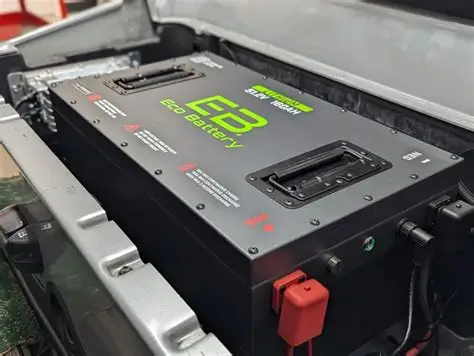
BMS Communication Errors: Troubleshooting "No Comms" on Lithium CANbus systems.
- A lithium "No Comms" message means the cart has lost data from the battery management system, not necessarily that the cells are empty.
- Use a DMM that reads resistance accurately, the battery maker's pinout, a flashlight, contact cleaner safe for connectors, and the battery app or display if available.
- With the system powered down, measure resistance across CAN High and CAN Low.
- Reseat connectors, dry and clean pins, repair rubbed twisted-pair sections, and restore the proper terminators before suspecting the BMS board.
This lab note breaks down BMS Communication Errors — Troubleshooting "No Comms" on Lithium CANbus systems. — into a measurement-first diagnostic flow you can run before swapping expensive parts.
What A “No Comms” BMS Fault Really Means
A lithium “No Comms” message means the cart has lost data from the battery management system, not necessarily that the cells are empty. CAN High, CAN Low, terminators, wake wires, firmware pairing, and charger handshake all become part of the diagnostic path.
What to do first: confirm the symptom is repeatable, then capture baseline readings. A “good” no-load voltage that collapses under load is a different failure than “no voltage anywhere.”
On a lithium golf cart the battery management system, or BMS, talks to the controller and charger over a CAN bus, usually a twisted pair carrying CAN High and CAN Low. A “No Comms” fault means those messages stopped arriving: the display goes blank or throws a comms code, the charger refuses to start because it never gets the BMS handshake, and the cart may drop into a limp or no-drive state even though the cells are healthy. The important mental shift is that this is a data problem first and a power problem second. The pack can be sitting at a perfect 53 volts with every cell balanced, and the cart will still be dead if the BMS and controller cannot exchange a single frame.
The most common root causes are dull and physical, not exotic. A CAN bus needs a 120 ohm terminating resistor at each end of the line; lose one and the bus reflects signals and drops out. Beyond that, watch for a corroded or backed-out pin in the communication connector, a chafed twisted pair that shorted CAN High to CAN Low or to chassis, a BMS that latched into protection and stopped transmitting after an over-temp or low-voltage event, and simple address or baud-rate mismatches after someone swapped a controller or flashed new firmware. Aftermarket 48V and 51V drop-in lithium kits from the last few years are especially prone to handshake mismatches when paired with an older E-Z-GO or Club Car controller that never expected to talk to a BMS at all.
CANbus Test Kit
Use a DMM that reads resistance accurately, the battery maker’s pinout, a flashlight, contact cleaner safe for connectors, and the battery app or display if available. If you have a CAN analyzer, it can help, but most field checks begin with resistance, voltage, and connector inspection. Photograph the BMS plug before unplugging it because some lithium harnesses use similar-looking connectors for charger, display, and CAN.
- Power down the pack before resistance checks.
- Confirm CAN High and CAN Low pins from the maker’s diagram.
- Keep the twisted pair routed away from motor and main battery cables.
Resistance, Voltage, And Handshake
With the system powered down, measure resistance across CAN High and CAN Low. A typical two-terminator bus reads about 60 ohms. Around 120 ohms usually means one terminator is missing. Open means the pair is broken. Near zero means the pair is shorted. Powered up, both lines often sit near 2.5V at rest, with small movement when messages are active. If pack voltage is healthy but the charger or controller refuses to wake, the handshake may be missing even though power is available.
Do not overlook firmware and pairing. Some batteries, chargers, and controllers speak different CAN protocols or need a setting changed after an update. If a fault appeared right after a controller swap, battery swap, app update, or charger change, verify compatibility before replacing hardware.
Restore Communication Cleanly
Reseat connectors, dry and clean pins, repair rubbed twisted-pair sections, and restore the proper terminators before suspecting the BMS board. If the BMS latched because of low voltage, over-temperature, or short protection, follow the maker’s wake or reset process after the root condition is gone. Secure the CAN harness so it cannot flex at the plug every time the seat opens. On carts with added accessories, keep reducers and light wiring away from the CAN pair to reduce electrical noise.
CANbus Takeaways
No-comms faults are solved by proving the data path, not by guessing at cell health. Start with pack voltage, then check CAN resistance, line voltage, connectors, terminators, and protocol compatibility.
If the bus tests healthy but messages still fail, involve the battery or controller maker with your readings. Telling support the bus is 60 ohms, the lines idle near 2.5V, and pack voltage is stable gets you much farther than saying the cart is dead.
Separate Bluetooth/app problems from vehicle CAN problems. A phone that will not pair with the battery app can be a permissions or pairing issue while the cart still communicates normally with the controller. A true vehicle no-comms fault usually affects charger start, dash data, or drive permission. If the app works but the cart does not, export or screenshot the BMS data before cycling power. Cell voltage, pack temperature, and protection flags can explain why the BMS stopped talking.
Frequently Asked Questions
What's the first reading I should take?
Record baseline pack voltage (and 12V system voltage if equipped), then repeat the same measurement while the symptom occurs. The delta is usually the clue.
Why does it work sometimes and fail under load?
High-resistance connections can pass small current but collapse voltage when current demand spikes. Voltage-drop testing and heat checks expose this fast.
Is it safe to test with the cart powered?
Only for measurements that require live power, and only with PPE, stable stands, and no loose tools. Isolate power before touching wiring.
Reviewed and updated July 10, 2026 by the Golf Cart Lab team.