
Testing Microswitches: The $5 Fix
A dead cart is often a five-dollar microswitch, but only a real continuity test on the right device finds it. Here is where each platform hides its switches, how to read them correctly, and the OEM part references, plus why an MCOR or ITS is not an ordinary switch.
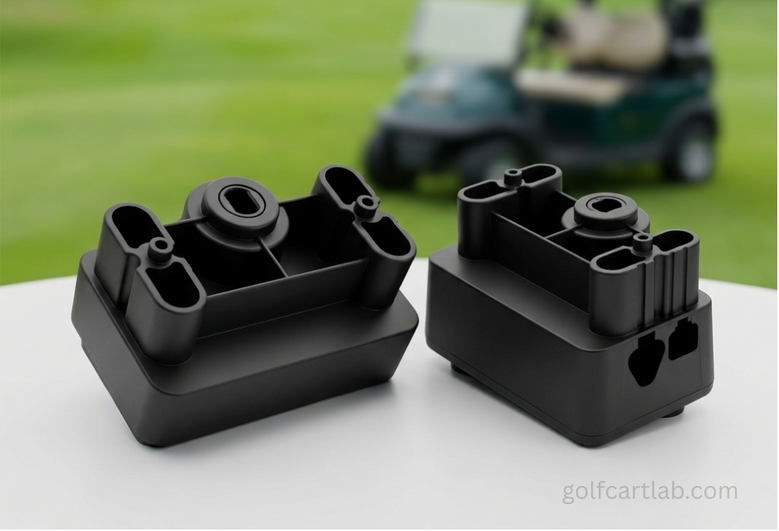
- A dead cart that does not even click is often a failed microswitch. Confirm it by unplugging the switch and testing continuity, not by guessing from wire colors.
- Identify the device first. A Club Car MCOR and an E-Z-GO ITS are sensor modules, not simple COM/NO switches, and must be diagnosed by their service range, not a beep test.
- Always isolate power and remove at least one lead so the meter does not read through the controller or a parallel path. A good NO path goes from OL to near lead-resistance when actuated.
- Check mechanical overtravel. If the cam or pedal never fully crosses the operating point, the switch can test bad while the real fault is adjustment or actuator travel.
The good news about a dead golf cart is that the cause is often a five-dollar switch rather than a controller or motor. The bad news is that golf-cart control systems mix true snap-action microswitches with sensors and modules that are diagnosed completely differently, so a careless continuity test can condemn a good part or miss a bad one. Identify the device from the wiring diagram first, disconnect pack power, and remove at least one circuit lead so your meter is not reading through a controller or another parallel path.
Switch Locations, Readings, and Part References by Platform
| Platform and device | Location and function | Common failure evidence | Reference (confirm by serial) |
|---|---|---|---|
| Club Car DS F/R neutral-lockout limit switch | At the F/R assembly, actuated by the cam; permits the run circuit in an allowed direction | No click, cam does not depress the lever, intermittent continuity, or action only when the shifter is pushed sideways | 1014808 legacy limit-switch reference |
| Club Car DS kill limit switch | Lower of the two limit switches in the electrical component box | Drive circuit stays open although the actuator fully depresses the lever | 101977101 or 101979101 sealed-switch references |
| Club Car MCOR | Mounted with the pedal group; translates accelerator movement into a controller input | Dead spot, unstable speed signal, poor pedal return, or output outside the model service range | Sensor module, not a generic COM/NO switch. Confirm MCOR generation. |
| E-Z-GO TXT pedal microswitch and ITS | Inside the pedal box; the microswitch requests the solenoid, the ITS gives a proportional signal | No solenoid request from the microswitch, or an ITS signal that will not change smoothly | 25861G01 catalog microswitch on some TXT configurations |
| Yamaha Drive / G29 pedal and selector switches | Pedal-area and direction circuits vary by market and harness | Intermittent enable, no controller request, corrosion at a sealed connector, or actuator travel that never reaches the switch point | JU2-H2727-00, JU2-H2917-00, JF7-82817-20 in distinct positions |
| Key switch on any platform | Panel or dash; provides logic power and sometimes separate direction contacts | Battery voltage enters but the selected output stays open or resistive under its small load | Use the vehicle diagram and OEM catalog; terminal count and logic differ |
Club Car’s DS factory switch test is binary: COM to NO has no continuity with the lever released and continuity with the lever pressed, and the manual also directs you to listen for an audible click and check cam movement. That model-specific procedure is far stronger than guessing from wire colors.
The Continuity Procedure
- Turn the key off, set Tow/Run to Tow where fitted, disconnect the charger, and isolate the battery pack per the manual. Wait for controller capacitors to discharge.
- Photograph the terminals, then remove at least one wire from the switch. Never apply an ohmmeter to a powered circuit.
- Identify COM, normally open, and normally closed from the markings or the exact diagram, not from blade position.
- Short the meter probes and record lead resistance. On the lowest range, measure COM to NO released and actuated, then COM to NC the same way.
- A good NO path goes from OL to a stable value near lead resistance; a good NC path does the opposite. The displayed resistance and its stability are better evidence than the beep.
- Operate the lever slowly at least ten times and move the harness gently. A reading that flickers, needs sideways pressure, or changes only when the case is twisted is failed or misadjusted.
- Check mechanical overtravel: the cam or pedal must cross the operating point without using the switch as a hard stop. Insufficient actuator travel can invalidate the test.
- Reconnect and back-probe the live circuit only if the manual calls for it, confirming the controller sees the transition under vibration.
Reading the Meter
| Meter result on an isolated basic switch | Meaning | Next action |
|---|---|---|
| OL released, stable near lead resistance actuated on COM-NO | Expected normally-open operation | Verify mounting and live input/output voltage. |
| Stable near lead resistance released, OL actuated on COM-NC | Expected normally-closed operation | Verify the diagram actually uses NC. |
| OL in both positions | Open switch or wrong terminals | Recheck terminal identification, then replace if truly open. |
| Continuity in both positions | Welded or shorted contacts | Replace the switch. |
| Reading flickers or needs case pressure | Worn or misadjusted switch | Replace or readjust actuator travel, then retest. |
You can jump the two switch wires together with the key on to confirm a diagnosis: if the solenoid then clicks and the cart runs, the microswitch was the fault. Do this for testing only and never drive with a switch bypassed, because you disable a safety interlock.
Most no-click dead carts come down to a cheap microswitch, but the win comes from testing the right device the right way: isolate power, remove a lead, identify COM/NO/NC from the diagram, and judge by stable resistance plus mechanical overtravel. Treat a Club Car MCOR or E-Z-GO ITS as a sensor with a service range, not a beep test. Confirm the OEM part by serial before ordering, and once you replace the switch, verify the controller sees the transition under real vibration.
Frequently Asked Questions
How do I know if my golf cart microswitch is bad?
The classic symptom is a dead cart: you press the pedal but the solenoid does not click and nothing moves. Confirm it by unplugging the switch and testing it on continuity mode. If the meter does not show continuity when the lever is pressed (or a good NO path does not go from open to near lead-resistance), the switch is defective. Check the actuator travel too, since a switch can test bad simply because the cam never reaches it.
Where is the microswitch located on my golf cart?
It varies by model. On E-Z-GO TXT carts it is in the pedal box under the floor mat. On Club Car DS models there are limit switches behind the Forward/Reverse assembly and in the electrical component box. On Yamaha carts the switches sit under the accelerator pedal and in the direction circuit. Always confirm the exact position against your model’s wiring diagram before testing.
Can I bypass a microswitch to test it?
Yes, for testing only. With the key on, unplug the two switch wires and touch them together. If the solenoid clicks and the cart runs, the microswitch was the problem. Never drive the cart permanently with the switch bypassed, because you disable a safety interlock that is there to stop unintended movement.
Is a Club Car MCOR a microswitch?
No. The MCOR (Motor Controller Output Regulator) is a sensor module that translates pedal movement into a controller signal, not a two-state COM/NO microswitch. Diagnose it by its model-specific service range and pedal-return behavior, not a continuity beep. The same applies to the E-Z-GO ITS, which provides a proportional accelerator signal rather than a simple on/off contact.
