YAMAHA G29 DRIVE WON’T GO FORWARD OR REVERSE
When a Yamaha G29 Drive won’t go forward or reverse, start with the tow/run switch, then the F&R sensor and contactor. This guide tests the drive circuit in order.
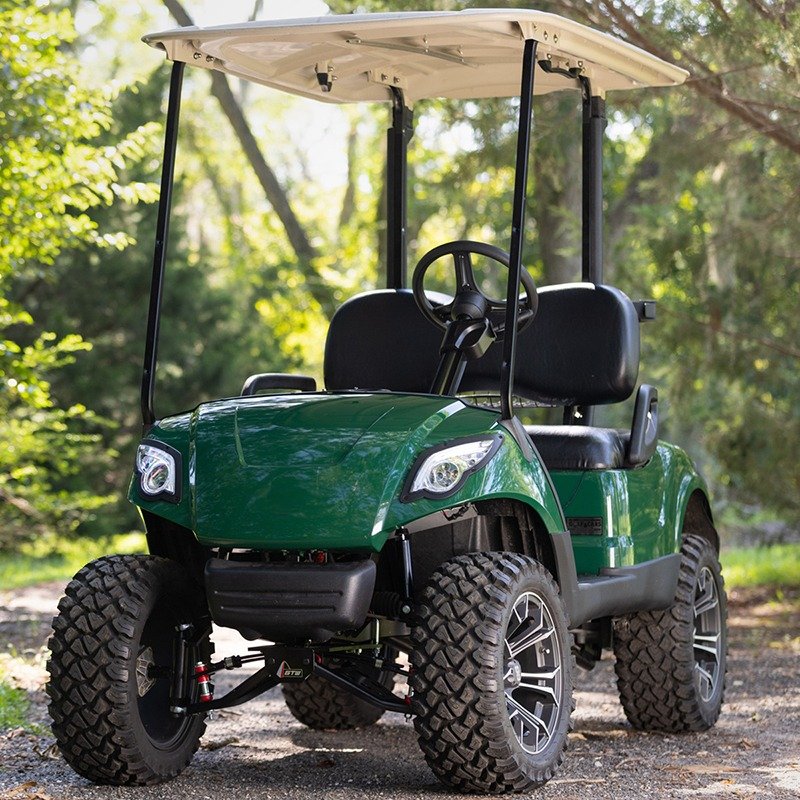
- Check tow/run first because it can disable drive while lights or accessories still work.
- Early and later G29/YDRE battery layouts are not identical, so count batteries before using individual battery targets.
- Use year-specific Yamaha diagnostics after pack, switch, fuse, contactor, and controller supply checks pass.
A Yamaha G29 Drive that has power but won’t move in either direction has a break in the drive-enable path. On the electric G29 the first thing to check is the simplest: the tow/run switch, which disables drive entirely when left in TOW. After that, the forward/reverse switch position sensor, the contactor, the battery pack, and the controller are the suspects. Work them in order and a multimeter, plus one obvious switch check, finds the fault fast.
01 : Check the Tow/Run Switch First
A Yamaha G29 won’t go forward or reverse often starts with one non-failed part: the tow/run switch. The YDRE owner manual says the tow switch must be in RUN before operating the car and must be moved to TOW before towing, with the drive select switch in FWD before towing. If the switch is left in TOW, the cart can have battery power and still refuse to drive in either direction.
Model year matters. The 2007 to 2008 YDRE parts and owner sources reviewed here show an early 48V Drive using four 12V batteries, while the 2016 YDREX6 parts catalog lists six battery assemblies. The older YDRE owner wiring page shows “BATTERY (4x12v)” and a 3 amp fuse. Do not assume every G29 has the same battery layout. Count batteries and read the serial/model plate before applying a voltage table.
| G29/YDRE battery layout | Verified source clue | Full rested target | 50% rested target | Note |
|---|---|---|---|---|
| Early YDRE, 2007 owner wiring | 4 x 12V shown in owner manual wiring page and 2008 parts catalog lists 4 x 12V T-1275 | 50.93V pack, 12.73V each | 48.41V pack, 12.10V each | Use 12V battery readings on these carts. |
| Later YDREX6, 2016 parts catalog | Battery assembly quantity 6 | 50.93V pack total if 48V flooded lead-acid | 48.41V pack total if 48V flooded lead-acid | Count cells and battery labels to determine 8V or other configuration. |
| Under-key check | Meter at controller B+ and B- while key and pedal call for drive | Should stay close to pack voltage | Large sag or drop means battery, cable, contactor, or connection fault | Public sources do not publish one universal G29 sag limit. |
02 : Why a Yamaha G29 Won’t Go Forward or Reverse: The Drive-Enable Path
The drive-enable path is tow/run, main switch, drive select switch, pedal input, controller enable logic, main relay or contactor, pack supply, and controller output. The YDRE owner manual names the main switch, drive select switch, tow switch, 48V charger requirement, wiring diagram, relay, 3 amp fuse, controller, and tow/storage switch. The 2008 and 2016 G29E parts catalogs list controller, electrical, relay assembly, main switch, F/R or drive-select switches, fuse on later carts, and battery assemblies.
That gives a test order. If no direction works, do not start with the motor. Start with the common enable items that affect both forward and reverse: tow/run, key switch, pack voltage, fuse, contactor, and controller supply. Direction-specific switches come next.
| G29 no-drive test | Expected reading or action | If this fails | Scope |
|---|---|---|---|
| Tow/run switch | RUN for driving. TOW disables drive for towing/storage | Switch to RUN. If no change, test switch continuity and output by service manual. | YDRE owner manual exact behavior. |
| 48V pack | About 50.93V full rested, 48.41V at 50% for flooded lead-acid 48V pack | Charge, rest, and load-test. Count battery layout first. | Battery benchmark plus Yamaha layout sources. |
| Main/key switch | Continuity in ON or control voltage out when ON | Repair switch or wiring before controller diagnosis. | Yamaha lists main switch assemblies by year. |
| Drive select/F/R input | Switch output changes between FWD, neutral, and REV | Repair sensor/switch, connector, or selector linkage. | Yamaha lists switch references, but exact test values are service-manual scoped. |
| 3 amp control fuse where equipped | Continuity through fuse; early YDRE owner wiring labels 3 amp fuse | Replace same rating and trace shorts if it opens again. | Verified in YDRE owner wiring and later catalog row. |
| Main relay/contactor | Clean click when enable path is valid; pack voltage transferred to controller side | No click means missing enable, coil feed, or failed relay. Click with no drive means contact, cable, or controller supply test. | Relay assembly part references vary by year. |
| Controller B+ and B- | Pack voltage present at controller main terminals during no-drive complaint | If absent, trace pack, contactor, and cables. If present, use Yamaha service diagnostics for inputs and fault history. | Controller type and diagnostics vary by G29 year. |
03 : Forward/Reverse Sensor and Contactor
If the tow/run switch is correct and the pack is healthy, test the selector next. The owner manual describes the drive select switch as the control used to shift into forward or reverse after a complete stop. The 2008 G29E parts catalog lists switch JU2-H2917-00 in the electrical section, and later catalogs list related switch parts by model. Those catalog rows confirm that Yamaha treats the selector input as a serviceable electrical part, but they do not publish one universal resistance or voltage value in the public owner manual.
Use the service manual for the exact year. In the field, the switch should change state cleanly as the selector moves from FWD to neutral to REV. A no-drive in both directions with no contactor click means the selector may not be the only issue, but an invalid selector signal can keep the controller from enabling either direction. If the contactor clicks in one direction but not the other, the F/R input moves higher on the list.
The contactor or relay is the next common point. A click means the coil side acted. It does not prove the large contacts passed current. Measure pack voltage on the battery side and controller side during command. If voltage arrives on one side but not the other, suspect contacts or cable lugs. A public G29 contactor coil resistance value was not found in the owner and parts sources reviewed here, so use the Yamaha service manual for coil-ohm testing.
04 : Battery Pack and Connections
Battery layout is the place G29 advice often goes wrong. The early YDRE owner wiring page shows 4 x 12V batteries, while the later YDREX6 parts catalog lists six battery assemblies. Both can make a nominal 48V cart, but individual-battery readings are different. A full 12V flooded battery is about 12.73V rested, while a full 8V flooded battery is about 8.49V rested. The pack total is the same 50.93V only after the cells add up to 48V nominal.
Measure at three places: across the whole pack, across each battery, and at controller B+ and B- during the no-drive command. If the pack is good at the batteries but lower at the controller, the problem is between those points: cable, fuse/control path, contactor, or connector. If one battery falls behind under load, handle the battery set before controller diagnostics.
05 : Controller and Fault Codes
Do not publish a fake G29 fault-code chart. The public YDRE owner manual and G29 parts catalogs reviewed here identify the controller, relay, tow switch, drive select switch, 3 amp fuse on the wiring page, and battery layout, but they do not publish a universal numeric controller fault-code table for every G29 Drive. Later Yamaha service manuals and dealer tools may have year-specific diagnostic steps, but those are not interchangeable across early DC Drive, later Drive variants, and Drive2 AC systems.
The documented public path is to verify the enable inputs and controller supply first. Tow/run must be in RUN. Pack voltage must be present and stable. The main switch must pass control voltage. The drive-select input must be valid. The relay or contactor must close and pass pack voltage. Controller B+ and B- must show pack voltage during the complaint. Only after those pass should a Yamaha service manual, dealer diagnostic tool, or controller-specific test procedure be used to read faults.
If the cart has a display, aftermarket controller, or conversion kit, use that device’s manual. A blink pattern from one controller brand does not transfer to a stock Yamaha controller. If no published code table is available for the exact installed controller, record the symptom, pack voltage, switch states, contactor behavior, and any display/blink pattern, then follow the controller maker’s diagnostic tree instead of guessing. If the tests point to a failed controller, the replacement controller finder lists the controllers and kits that fit your G29.
Why the tow/run switch traps so many owners
The tow/run switch strands owners because it disables the drive system without making the cart look completely dead. Lights, gauges, or accessories can still make the cart feel alive while the controller is intentionally kept from driving. Yamaha tells operators to use RUN before driving and TOW before towing to protect the drive system. If the cart was recently pushed, hauled, serviced, washed, or stored, check this switch first. Cycle it deliberately, return it to RUN, then retest. If RUN does not restore drive, test switch continuity and output rather than bypassing it.
All of the checks above assume the fault is electrical. If the motor spins while the cart stays still, the electrical side has already proved itself and the break is mechanical, which is covered in the guide to a golf cart that will not move while the motor spins.
A Yamaha G29 Drive that will not go forward or reverse should be tested through the common drive-enable path before parts are replaced. Confirm tow/run in RUN, count the battery layout, check the 48V pack against rested voltage benchmarks, verify key and drive-select inputs, test the 3 amp control fuse where equipped, listen for contactor click, and measure controller B+ supply. Yamaha public sources do not publish one universal G29 numeric fault-code table or contactor coil resistance value, so the accurate repair path is year-specific service diagnostics after the basic enable checks pass.
FAQ
Why won’t my Yamaha G29 go forward or reverse?
A Yamaha G29 Drive that won’t go forward or reverse but has power often has the tow/run switch left in TOW, a forward/reverse position-sensor fault, a failed contactor, a sagging battery pack, or a controller fault. Check the tow/run switch first, it disables drive entirely, then work the rest of the drive-enable path.
What does the tow/run switch do on a Yamaha G29?
The tow/run (or run/tow) switch disconnects the drive system so the cart can be towed or serviced safely. Left in TOW, a G29 will have lights and power but won’t move in either direction. Switching it back to RUN restores drive, it’s the most common false alarm for a no-move G29.
Where is the tow/run switch on a Yamaha G29?
On the electric G29 Drive, Yamaha identifies a tow switch in the under-seat electrical area alongside the drive-select controls. Lift the seat and use the owner’s manual diagram for the exact year and serial rather than relying on a generic photo, because wiring and battery layouts changed across G29 versions. Put the switch in RUN before diagnosis or driving.
What fault code shows when a Yamaha G29 will not drive?
There is no verified universal numeric G29 fault-code table in the public owner manual and parts catalogs used here. Check tow/run, pack voltage, the control fuse where equipped, key and drive-select inputs, relay action, and controller B+ first. Then use the service procedure for the exact controller and model year, recording any display or indicator behavior rather than applying a code chart from another controller family.