ICON Golf Cart Slow on Hills: Fix & Diagnosis
When an ICON bogs down or cuts power on a climb, verified pack voltage, thermal, and tire-gearing numbers show exactly where the torque is going.
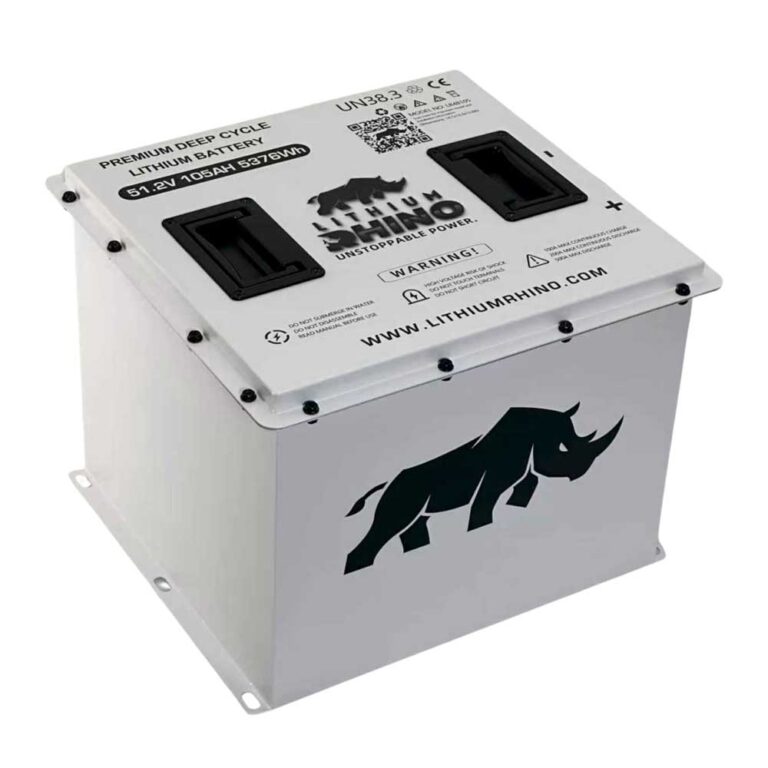
- Eco Battery 51.2V Gen3 packs: 48.0V recommended cutoff, 46.4V BMS recovery voltage.
- 250A continuous discharge rating explains why short climbs are fine but repeated ones sag.
- A 23-inch lifted tire cuts wheel torque about 21% versus the stock 205/50-10 tire.
- Thermal cutback is worst after repeated climbs; pack sag is worst on a low charge.
- Work pack, then heat, then load/tires, then drivetrain, in that order.
A flat-ground ICON that feels fine but bogs down, slows, or cuts power on a hill is showing the most demanding moment for any electric cart. Climbing draws the highest current, which exposes a weak or aging lithium pack, triggers thermal protection, or reveals an overloaded or poorly set-up cart. The good news is that hill performance is a great diagnostic: the conditions that cause it are specific and testable with real numbers.
01: Check the Lithium Pack and State of Charge First
Climbing is when the pack works hardest, so a battery that is fine on the flat can sag badly on a hill. A low state of charge or an aging pack drops voltage under the climb’s high current, and the BMS may cut power to protect the cells.
ICON has shipped lifted street-legal carts since roughly 2018, and the i20, i40, and EV6 models sold from about 2021 onward almost all use a 48V lithium pack, commonly a 105Ah LiFePO4 unit. Unlike lead-acid, a lithium pack holds a nearly flat voltage right up until it is close to empty, then drops off a cliff. So an ICON can feel completely normal on flat pavement at 25 percent charge and then suddenly bog or shut down the moment you point it up a grade. ICON’s onboard state-of-charge gauge is not always honest at the bottom of the range; owners regularly report the display still showing two or three bars while the pack is actually near cutoff under load. Trust a full charge and a load test over the dash gauge.
| Reading | Verified Number | Hill Diagnosis Meaning |
|---|---|---|
| Nominal pack | 51.2V, 16 LiFePO4 cells | Normal Eco lithium architecture; mid-charge voltage looks deceptively flat |
| Working range | 43.2V to 58.4V | A hill sag event near the lower end is not normal; stop and charge or diagnose |
| Recommended cutoff | 48.0V | Loaded voltage falling near this point on a climb makes pack/cables the first suspect |
| BMS recovery | 46.4V | A cart that wakes only after recovery voltage was likely in protection, not just slow |
| Discharge rating | 250A continuous, 550A/10s, 600A/5s | Short bursts are expected; repeated long grades expose weak cells or high resistance |
Do not treat the 43.2V floor as a normal driving target. Eco’s own recommended cutoff is 48.0V, and the Gen3 meter can report E05 Cell Under Voltage, E07 Pack Under Voltage, or E15 SOC Low well before that floor. The 2.5V per-cell figure often seen in general LiFePO4 documentation works out to 40.0V on a 16-cell pack, but ICON and Eco Battery do not publish that as a universal owner trip point, so use it only as a general chemistry reference.
- Charge fully first: Retry the hill on a full pack. If climbing power returns, the pack was simply low.
- Aging pack: A pack that climbs poorly even when full may be losing capacity, see ICON battery problems.
02: Rule Out Motor and Controller Thermal Cutback
Repeated or long climbs heat the motor and controller. When they hit a thermal limit, the controller cuts power to protect them, which feels like the cart giving up partway up the hill. This often pairs with a reduced-speed limp mode. A useful tell is timing: a pack problem is worst first thing when charge is low and improves after charging, while a thermal problem is worst after two or three hard climbs when the drive components are hot.
Thermal numbers, with the right caveat: there is no verified public ICON-specific controller or motor temperature threshold for hill cutback. ICON does publish the i40/i40L hardware level: a 450A ICON controller and a 48V, 5kW, 3-phase high-torque motor. For the general EV controller family commonly used as a service reference, Curtis 1234/1236/1238 documentation says linear heatsink cutback starts at 85°C (185°F) with complete cutoff at 95°C (203°F). That is not an ICON-published spec, so treat it as a general controller benchmark, not confirmation of what your specific cart does.
| Thermal Clue | Verified Number / Code | How to Use It |
|---|---|---|
| ICON hardware | 450A controller, 48V 5kW motor | Large current capability does not remove heat limits on repeated climbs |
| General controller cutback | 85°C starts linear heatsink cutback | Use only as a general Curtis-family reference unless an ICON scan confirms actual temperature |
| General controller cutoff | 95°C complete heatsink cutoff | A cart reaching this range needs cooling, load, and mounting checks before more hill runs |
| Fault split (Curtis-style) | Code 22 = controller overtemp, Code 28 = motor hot cutback | Ask the dealer which temperature source triggered the event instead of guessing from the symptom |
- Let the cart cool for 15 to 30 minutes after a hard climb.
- If power returns after cooling, manage long climbs and avoid back-to-back hauls in hot weather.
- Overheating with light use points to a dragging brake, binding drivetrain, or a cooling problem, see ICON reduced speed.
03: Verify Load, Tires, and Gearing
An ICON is rated for a specific passenger and cargo load. Overloading it naturally cuts climbing speed and can trigger protection. Tire and lift changes matter too: oversized tires effectively raise the gearing, which hurts low-speed torque on hills. Many i40 and i60 carts leave the factory already lifted on 20 or 23 inch tires, and owners often go bigger still. Every inch of added tire diameter behaves like taller gearing, so a stock ICON that climbed fine on its original tires can start bogging after a tire upgrade even though nothing electrical changed.
ICON’s i40 spec sheet lists the non-lifted tire as 205/50-10 (calculated diameter about 18.1 inches using the standard tire-code formula) and the i40L spec sheet lists 23×10.5-12 lifted tires. Both spec sheets list a 14:1 high-speed rear axle. Since a taller tire travels farther per axle revolution, it lowers the effective gear ratio at the ground and reduces wheel torque by the same diameter ratio, even though the axle itself never changed.
| Tire Setup | Diameter | Effective 14:1 Gearing | Climb Torque vs Stock |
|---|---|---|---|
| Stock i40 205/50-10 | 18.1 in calculated | 14.0:1 baseline | 100% |
| 20 in tire | 20.0 in nominal | 12.7:1 effective | 90.4% (about 9.6% less) |
| Lifted i40L 23×10.5-12 | 23.0 in nominal | 11.0:1 effective | 78.6% (about 21.4% less) |
The same math explains why a 23 inch tire can raise top speed while making the cart worse on hills: at the same motor rpm it covers more ground per revolution, but at the same motor torque it pushes on the pavement with less force. If the cart slowed right after a tire change, test it light, check tire pressure, and compare the new tire’s actual measured height against the original.
- Load: Try the hill with less weight to see if performance returns.
- Tires/lift: If hill power dropped after fitting larger tires, the gearing change is the cause, our lift and tire fitment calculator shows how size affects performance.
04: When the Drivetrain Is Actually the Cause
If the pack is healthy and full, the cart is not overheating, and the load and setup are normal but it still cannot climb, look at the drivetrain. Confirm there is no mechanical drag first (jack a wheel and spin it; it should turn freely). A dragging rear brake or a slightly seized wheel bearing adds constant load that only shows up as weak climbing. ICON has also issued controller software updates over the years, and an out-of-date controller can hold back current more aggressively than needed; a dealer flash to current firmware occasionally restores hill power on carts that were bogging for no obvious mechanical reason. Work through pack, heat, load, and gearing first, confirm no drag, and only then treat the motor or controller as the culprit.
Hill power loss on an ICON points first to the lithium pack (low or aging), then thermal cutback, then load and tire setup. A full, healthy pack with a normal load and gearing should climb without cutting out.
Frequently Asked Questions
Why does my ICON golf cart lose power going uphill?
Climbing draws the most current, so the usual causes are a low or aging lithium pack that sags under load, thermal cutback from repeated climbs, or simply too much weight. Charge fully and retry; if it still bogs on a full pack, suspect pack aging or the drivetrain.
Can big tires make an ICON slower on hills?
Yes. Oversized tires raise the effective gearing, which reduces low-speed torque and hurts hill climbing. If performance dropped after a tire or lift change, the gearing is the likely cause.
Why does my ICON cut out partway up a hill?
That is usually thermal or BMS protection. A hot motor or controller, or a pack sagging under the climb’s high current, causes the controller to cut power. Let it cool and charge fully, then retry before suspecting the motor or controller.